

ClamXAV introduces protection from ClickFix malware
Have you ever wondered how malware can infiltrate devices without a trace? Frequently, this is achieved through ClickFix malware. Malware campaigns are on the rise, preying on unsuspecting users, and in this blog post, we will explore what ClickFix malware is, how it operates, and what you can do to protect yourself, focusing on the new ClamXAV feature designed to combat this threat.
With a growing number of reported cases, keeping your devices secure has never been more critical. Whether you’re a tech enthusiast or someone who simply wants to browse the internet worry-free, this article will help you stay safer online.
Understanding ClickFix Malware
ClickFix is the name given to a mechanism which is used by some malware to infect your computer. It is usually disguised as instructions to fix some issue on your computer. It tricks users into copying malicious commands to the clipboard which would then be pasted into the macOS Terminal app. Once pasted, the malware can gain full access to your computer, allowing cybercriminals to obtain sensitive information like passwords and banking details, or any other files you may have on your computer.
What does ClickFix look like?
There are variants of the ClickFix campaign, but the most common thing you’ll come across is instructions which say something like “Select the following text and hit Command-C on your keyboard. Open Terminal.app and hit Command-V”.
Below is a screenshot from a recently uncovered campaign (Infinity Stealer) which uses ClickFix as the infection mechanism for malware which would steal password data and other information from your computer.
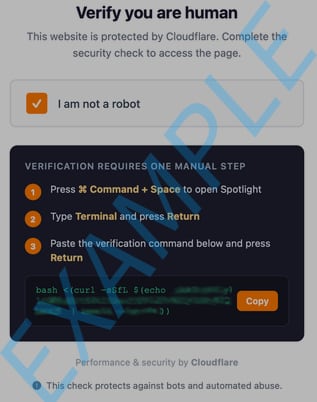
That’s it. That’s all it takes to infect your Mac. It’s a simple, but devastating tactic.
What Makes ClickFix So Dangerous?
One of the key reasons ClickFix is so dangerous is its stealthy nature. Unlike traditional malware delivery methods, ClickFix can operate silently without leaving any files on the computer. It not only bypasses traditional antivirus software, but also Gatekeeper (Apple’s built-in security).
How do I guard against it?
Fear not! ClamXAV has a new feature designed specifically to target ClickFix malware, to protect your clipboard and your Mac. With the new ClickFix protection we added to ClamXAV 3.10, as soon as any malicious-looking content goes anywhere near your clipboard, ClamXAV will display a warning and offer to clear the clipboard to keep you safe.
To enable this additional level of security, go into ClamXAV’s Settings -> Advanced, and turn on “Monitor clipboard for malicious contents”.
Does this mean you can see everything I copy?
No. As with everything else ClamXAV does, we’re incredibly protective of your privacy. All processing is done directly on your computer - your data never leaves your Mac. Our privacy policy doesn’t even need to change.
What else can I do to protect myself online?
Cybersecurity is not just about software; it’s also about adopting a proactive approach online:
-
Never copy and paste commands from a web page or email into a Terminal window.
-
Before clicking links, always hover your mouse over them and look at the URL that appears in the tooltip. Does the URL match what you know to be the real website?
-
Avoid downloading software from unknown and untrustworthy sources.
-
Keep your Mac’s operating system and apps up-to-date - malware frequently exploits known security flaws in outdated software.
-
Enable two-factor authentication (2FA) on any websites which offer it. If you’re not sure what this is, please see our earlier post on Multi-Factor Authentication
-
Educate Yourself: Subscribe to our newsletter to stay up-to-date on current malware threats.
-
Use Secure Networks: Avoid using public Wi-Fi for sensitive transactions.
-
Manage Privacy Settings: Regularly review the permissions you grant apps and tools on your devices. Only give access to those you trust completely.
As technology evolves, so does the sophistication of malware. The importance of protecting your personal information cannot be overstated. Employing tools like ClamXAV and adopting good browsing habits is a practical path to safeguarding your computer and yourself online.
Buy ClamXAV now to protect your clipboard and safeguard your data.
Your digital safety isn’t merely an option. It’s a necessity.